Password Manager App for Android - Passwarden
Last updated: Jun 19, 2026
Shortly: What is Password Manager?
A password manager is a tool or software designed to securely store and manage passwords. It eliminates the need for users to remember multiple passwords for different accounts and websites. A password manager typically encrypts and stores passwords in a secure vault, which can only be accessed with a master password or biometric authentication. It also offers features like password generation, autofill functionality, and cross-platform compatibility. With a password manager, users can create strong and unique passwords, easily log into websites and apps, and protect their online accounts from hacking and data breaches. Overall, a password manager is an essential tool for maintaining online security and privacy.
Strong and Easy to Use Android Password Manager - Passwarden (Installation, pros & cons)
In today's digital age, where security breaches and data thefts are becoming increasingly common, it is crucial to prioritize the protection of our personal information. With so many online accounts and passwords to remember, using a reliable password manager has become essential. If you are an Android user and are seeking a secure and user-friendly password manager, look no further than Passwarden. In this blog post, we will explore the pros and cons of Passwarden and discuss some of its best features.How to install?
Installing Passwarden password manager on your Android phone is a straightforward process. Here's a step-by-step guide to help you get started: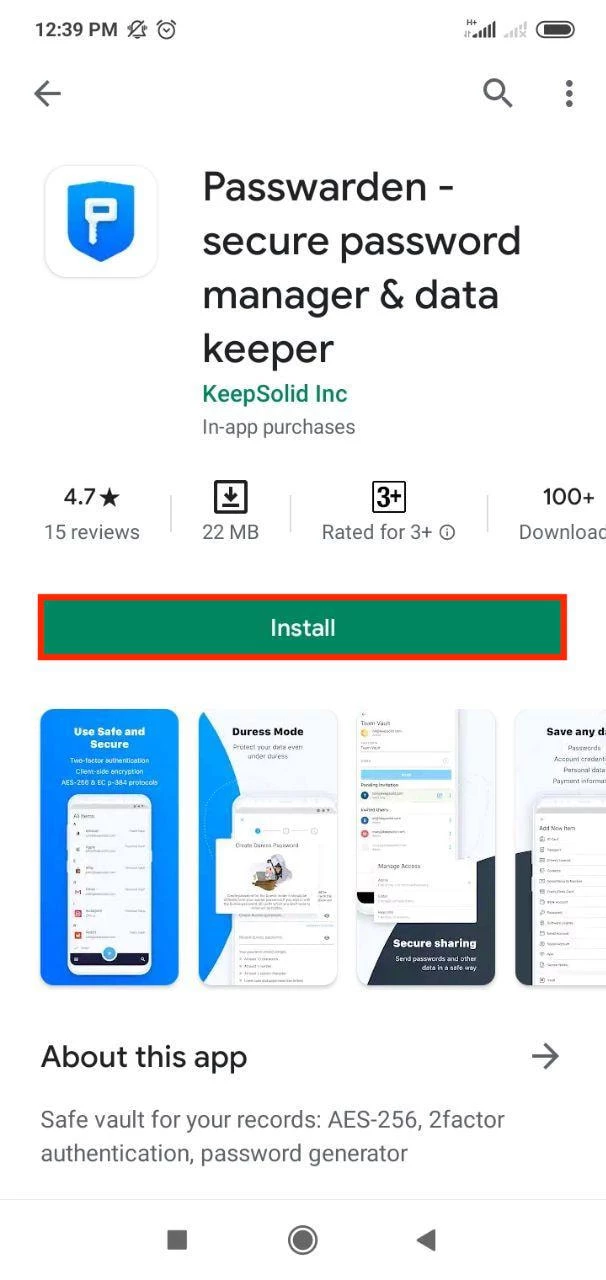 1. Go to the Google Play Store:
- On your Android phone, open the Google Play Store app.
- Tap on the search bar at the top of the screen.
- Type "Passwarden" in the search bar and tap the search button.
- Look for the Passwarden app in the search results.
- Tap on the Passwarden app in the search results to open its details page.
- On the app's details page, tap the "Install" button.
- Review the app permissions, and if you're comfortable with them, tap "Accept" or "Install" to proceed with the installation.
- Once the installation is complete, open the Passwarden app.
- Tap on the "Sign Up" or "Create Account" button to create a new Passwarden account.
- Follow the on-screen instructions to enter your email address and create a master password for your Passwarden account.
- If you have passwords stored in another password manager or browser, Passwarden provides an option to import them.
- Follow the in-app instructions to import your passwords into Passwarden.
Pros of Passwarden:
1. Advanced Security Measures: Passwarden takes the security of your data seriously. It employs strong end-to-end encryption, ensuring that only you have access to your passwords and other sensitive information. With Passwarden, you can rest assured that your data is safe from hackers and prying eyes. 2. Cross-Platform Compatibility: Passwarden is not limited to Android devices only. It offers seamless synchronization across multiple platforms, including iOS, Windows, macOS, and web browsers. This means that you can access your passwords and other data from any device or platform with ease. 3. User-Friendly Interface: One of the standout features of Passwarden is its intuitive and user-friendly interface. The app is designed to be simple and easy to navigate, even for less tech-savvy individuals. With Passwarden, you can effortlessly store and manage your passwords without any hassle. 4. Password Generator: Creating strong and uniquepasswords is essential for protecting your online accounts. Passwarden includes a built-in password generator that allows you to easily create strong and secure passwords. This feature saves you time and ensures that your passwords are virtually impossible to crack. 5. Autofill Functionality: Passwarden integrates with your Android device's autofill feature, making it even more convenient to use. You no longer have to manually enter your passwords every time you visit a website or log into an app. Passwarden will automatically fill in your login information, saving you time and effort.Cons of Passwarden:
1. Limited Free Version: While Passwarden does offer a free version, it comes with some limitations. The free version only allows you to store a limited number of passwords and does not include some advanced features available in the paid version. However, the paid version offers a more comprehensive solution and is well worth the investment. 2. Initial Setup: Setting up Passwarden and transferring your passwords from other password managers may require some initial effort. However, the app provides step-by-step instructions to guide you through the process, making it easier for you to get started. In conclusion, Passwarden is a reliable and secure password manager for Android users. Its advanced security measures, cross-platform compatibility, user-friendly interface, password generator, and autofill functionality make it a standout choice. While there may be some limitations in the free version and an initial setup process, the benefits and peace of mind that Passwarden provides are well worth it. Whether you're a frequent traveler or just want to keep your personal data safe, Passwarden is a must-have app for anyone looking to protect their passwords and online accounts. So go ahead and download Passwarden today, and take the first step towards securing your digital life. Also we recommend you to check the list of other password managers on wiki ( https://en.wikipedia.org/wiki/List_of_password_managers ):