- No viruses
- No spyware
- No malware
This file was downloaded, scanned and installed by our editors before publishing.
Every file is also checked with VirusTotal before publishing.
![Game Guardian [No Root] APK Android](/wp-content/uploads/2023/03/Game-Guardian-1-150x150.webp "Game Guardian [No Root] APK Android")
GameGuardian APK (Root & No Root)
![Game Guardian [No Root] APK Android video](https://img.youtube.com/vi/J-GBAz3EEwI/hqdefault.jpg)
Additional information about GameGuardian APK (Root & No Root)
The description of GameGuardian APK (Root & No Root)
GameGuardian APK is a memory editor for Android games: it hooks into a running game and lets you search for values held in memory, coins, HP, timers, ammo, and change them on the fly. It is not a mod of one game. It is a single tool that works across many of them, which is why people search for the game guardian apk before anything else. On this page you can download the latest version, scanned for malware and installed on a real Android device by our editors before publishing.
One thing to know up front: GameGuardian is not on Google Play, and it never has been. Google's rules ban memory-editing tools, so the only way to get it is as an APK, from the official site, gameguardian.net, or from a checked catalog like this page. The file here is the original tool, not a repackaged fake.
What is GameGuardian?
GameGuardian is a memory editor that has been around since 2012, built and maintained by the developer known as d2dyno and the GameGuardian team. The official site counts more than 216 million downloads, which makes it the best-known tool of its kind on Android.
The idea is simple. Most games keep your numbers, money, health, a countdown, somewhere in the device's memory while they run. GameGuardian attaches to that game's process, finds the number you point it at, and rewrites it. Nothing about the game's own files is touched; the change happens live, in memory, while you play. Because it works at that level, one tool covers a huge range of single-player games instead of a single title.
Key features
| Feature | What it does |
|---|---|
| Value search | Exact, fuzzy (unknown value) and encrypted search to track down a number even when the game hides it. |
| Data types | Dword, Float, Double, Qword, Word, Byte and XOR, so it reads the format the game actually stores. |
| Edit all results at once | Found a hundred matching addresses? Change them in a single action. |
| Speedhack and time jump | Speed a game up or slow it down, or skip long in-game timers. |
| Lua scripts | Run community scripts for repeatable tasks instead of searching by hand every time. |
| Floating overlay | A small, semi-transparent icon sits on top of the game so you can search without leaving it. |
| Broad support | ARM and x86, 32-bit and 64-bit, and popular Android emulators. |
Root or no root?
You can run GameGuardian either way. What changes is how much reaches it.
With root, GameGuardian gets full access to every process on the device. This is the stable route and the one the tool was built for, searches are faster and more games are reachable.
Without root, you go through a virtual space app, Parallel Space, VirtualXposed, VMOS or VPhoneGaga. Install the virtual space, then install both GameGuardian and the game inside it, and launch the game from that virtual environment. GameGuardian can then read the game's memory because both live in the same sandbox. It is a few extra steps and a bit slower, but no root is needed at all.
How to download and install GameGuardian
- Tap the green Download APK button at the top of this page, the file downloads directly, no registration or SMS.
- Allow installation from unknown sources for your browser or file manager (Settings → Security).
- Open the downloaded file, tap Install, and launch the tool.
New to sideloading? Our APK install guide walks through the same steps with screenshots. One note that surprises people: after install, GameGuardian hides its icon and uses a random package name. That is normal, built-in behaviour to avoid detection by games. It is not a sign of a virus.
How to use GameGuardian (quick start)
The basic loop is the same in every game:
- Start GameGuardian, then open the game you want to work with.
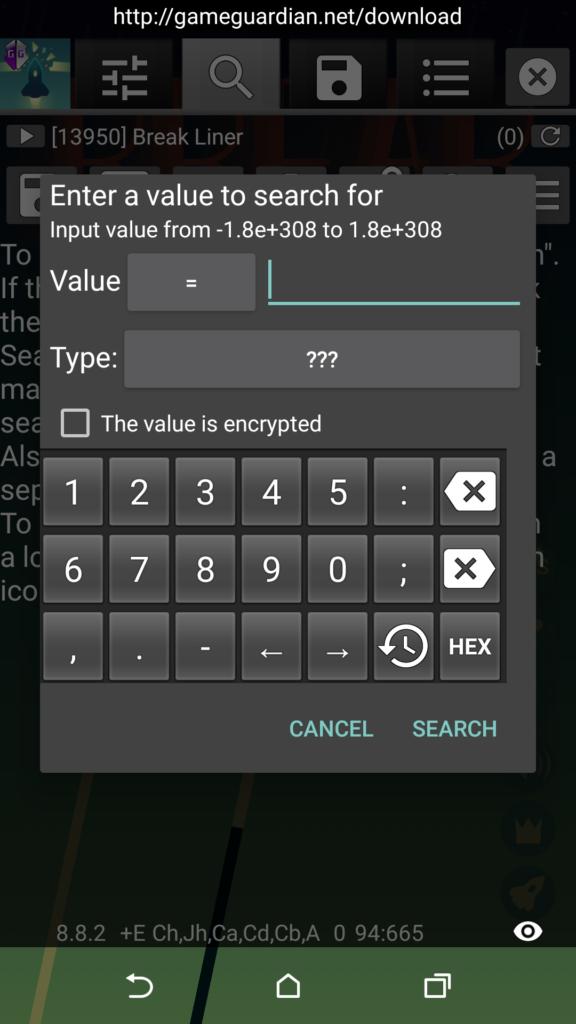
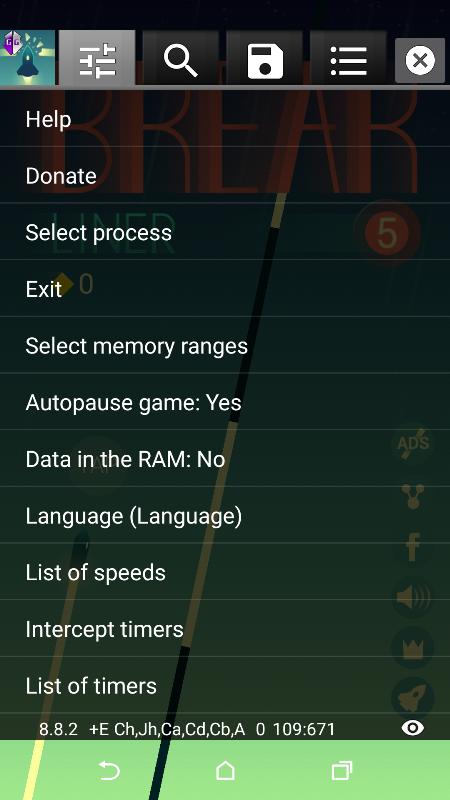
- Tap the floating icon and pick the game's process from the list.
- Search for a number you can already see. Your coin count, for example.
- Change that number in the game (spend or earn a few coins), then search again to narrow the results down to the one address that matches.
- Edit that value to what you want and check it in the game.
If the first search returns too many results, that second refining search is what pins down the right one. For long timers or slow grinding, the speedhack lets you run the game faster instead of waiting.
Online games: what to expect
In single-player and offline games, you use GameGuardian freely, the numbers live on your own device, so they are yours to change. Online games are different. There the important values are checked on the game's server, not on your phone, so editing them locally changes nothing that sticks, and the account risks a ban from the game's anti-cheat. For online titles the tool has no real use. This is not a reason to skip the download; it is just where the tool stops being useful.
Looking for related tools? Browse the tools section, try the APK Editor Pro for editing app files directly, or check the glossary if a term like APK or root is new to you.
FAQ
Is GameGuardian safe?
Does GameGuardian need root?
How do I use GameGuardian without root?
Can you get banned for using GameGuardian?
Is GameGuardian free?
Why is GameGuardian not on Google Play?
Download Game Guardian [No Root] APK Android
- No viruses
- No spyware
- No malware
The reviews (2)